
Quick Article Directory
USB-C Hub Wholesale Buying Guide for Importers and Retail Buyers
Topic Research and Search Intent
Blog title: USB-C Hub Wholesale Buying Guide for Importers and Retail Buyers
Target keyword: USB-C hub wholesale buying guide
Search intent: Overseas buyers want to compare USB-C hub suppliers, understand which port combinations are suitable for their target customers, verify PD pass-through and HDMI performance, and prepare a clear RFQ before ordering samples or bulk production.
Why this topic fits a B2B export website: USB-C hubs are high-intent accessory products because buyers often need practical answers before purchasing: which ports sell best, whether a hub supports laptops and tablets, how to avoid overheating, what factory testing is required, and how retail packaging should be prepared. This makes the topic useful for Google SEO, AI Overview style answers, and inquiry conversion.
Introduction
USB-C hubs have become essential accessories for laptop users, tablet users, office workers, students, creators, and business travelers. As more notebooks remove legacy ports, buyers need compact adapters that can connect HDMI displays, USB-A peripherals, memory cards, Ethernet, and charging cables through one USB-C interface. For importers and retail distributors, the opportunity is clear, but the purchasing decision is not as simple as counting ports.
Many USB-C hubs look similar in product photos. A six-in-one hub may include HDMI, USB-A, USB-C PD, SD, microSD, and Ethernet, while another model may use nearly the same shell but a different chipset, different heat control, or weaker cable strain relief. These differences affect return rates, customer reviews, and repeat orders. Buyers should evaluate USB-C hubs as electronic systems rather than simple metal accessories.
This guide is written for B2B buyers sourcing USB-C hubs for retail stores, online marketplaces, corporate IT procurement, education channels, and private-label programs. It explains how to choose port combinations, what technical specifications to confirm, how to plan factory testing, and what information to include in a quotation request.
For related accessory sourcing, buyers can also review ByteAero's internal guide on power banks and fast chargers, because charging compatibility and USB-C behavior often influence the same customer purchase.
Start with the Real Product Application
The best USB-C hub for one buyer may be the wrong model for another. A corporate office customer may prioritize HDMI output, stable USB-A ports, Ethernet, and PD charging. A university channel may need lightweight hubs for tablets and student laptops. A retail electronics chain may prefer premium aluminum housing, clear packaging, and universal compatibility claims that are easy for end users to understand. A travel accessories buyer may need compact size and strong cable durability.
Before requesting samples, define the product application:
- Will the hub be used mainly with laptops, tablets, or smartphones?
- Is the buyer selling through retail stores, online marketplaces, corporate tenders, or education channels?
- Does the product need HDMI, VGA, Ethernet, SD card slots, or multiple USB-A ports?
- Is PD pass-through charging required, and what wattage will be advertised?
- Will the order use neutral packaging, ByteAero packaging, or private-label packaging?
Clear application planning helps suppliers recommend the right model instead of sending a generic price list. It also helps prevent mismatches, such as selecting a low-cost hub without Ethernet for a business buyer who expects wired network support.
Key Specifications to Confirm Before Sampling
Port Combination
Port selection should match the target customer. Common configurations include 4-in-1, 5-in-1, 6-in-1, 7-in-1, and 8-in-1 hubs. Entry-level retail models often include HDMI, USB-A, USB-C PD, and card readers. Office-focused models may add Ethernet. Creator-focused models may emphasize SD and microSD transfer performance. Buyers should avoid adding ports only for marketing value if those ports increase cost or create thermal risk.
HDMI Output
HDMI support is one of the most important features in a USB-C hub. Buyers should confirm whether the model supports 4K at 30Hz or 4K at 60Hz, and under what host-device conditions. A product may advertise 4K, but the user experience depends on the laptop, cable, monitor, and chipset. During sample testing, connect the hub to common Windows laptops, MacBook models, tablets, and at least one 4K monitor. Check display stability, wake-from-sleep behavior, and whether the shell becomes too hot during a long presentation.
USB-C PD Pass-Through
USB Power Delivery matters because many users expect to charge a laptop while using the hub. The USB-IF maintains official information about USB Power Delivery, and buyers should use supplier claims carefully. Confirm input and output wattage, heat behavior under load, and whether the hub reserves part of the power for itself. If a hub is advertised as 100W PD pass-through, the actual power delivered to the laptop may be lower after operating loss.
Data Transfer and Card Reader Performance
USB-A ports may support USB 2.0 or USB 3.x speeds depending on the model. For price-sensitive retail, USB 2.0 may be acceptable for basic keyboard, mouse, or flash drive use. For creator or office markets, USB 3.x support is more important. SD and microSD readers should be tested with common cards and file-transfer workflows. Buyers do not need laboratory testing for every sample, but they should confirm whether performance matches the sales promise.
Shell Material and Thermal Design
Aluminum housing often feels premium and can help with heat spreading, but material alone does not guarantee stability. Thermal design depends on chipset selection, PCB layout, port load, and how the hub is used. During factory testing and sample review, run HDMI output and PD charging at the same time for a practical stress check. A warm shell is normal for some hubs; unstable display output, disconnection, or excessive heat is not acceptable.
Factory Testing and Shipment Inspection
USB-C hubs should be tested as functional products before shipment. A practical inspection process can reduce common issues such as wrong port layout, defective HDMI output, loose connectors, incorrect packaging, or missing accessories.
Recommended factory testing includes:
- Appearance inspection for scratches, dents, shell color variation, and logo accuracy.
- Port insertion test for USB-C, USB-A, HDMI, card slots, and Ethernet when included.
- HDMI output test with a laptop and monitor.
- PD charging test with a compatible charger and notebook.
- USB data transfer test using a flash drive.
- Card reader test for SD and microSD models.
- Cable strain relief inspection.
- Packaging and barcode verification before carton sealing.
For shipment inspection, buyers should define AQL level, carton quantity, color mix, packaging language, and accessory list before production begins. If private-label packaging is used, the artwork should be confirmed before mass printing. A simple sample approval record helps both buyer and supplier avoid disputes.
Packaging and Private Label Preparation
USB-C hubs are often sold as retail accessories, so packaging affects conversion. Buyers should prepare product name, core feature list, compatibility notes, barcode, warranty text, country label requirements, and manual language. Avoid overly broad claims such as "compatible with all devices." A more trustworthy description might say "compatible with USB-C devices that support DisplayPort Alt Mode for HDMI output."
Private-label buyers should also confirm logo placement on the shell. Laser engraving, screen printing, and pad printing have different visual effects and costs. For premium retail, simple logo placement and clean packaging often look more professional than crowded claims.
Common Buyer Mistakes
One common mistake is choosing a hub only by port count. More ports can increase cost and complexity without improving user satisfaction. Another mistake is ignoring host-device compatibility. HDMI output, PD charging, and high-speed data transfer depend on both the hub and the device connected to it. Buyers should also avoid approving packaging before testing real samples, because the product claim must match actual performance.
Supplier Evaluation for Long-Term Orders
USB-C hubs are not always purchased as one-time products. Retailers and distributors often reorder the same model if customer feedback is stable. For this reason, supplier evaluation should include production consistency, not only sample quality. A good sample is useful, but the buyer should also ask how the supplier controls chipset sourcing, shell color consistency, cable assembly, packaging artwork, and final inspection.
For repeat orders, buyers should confirm whether the same chipset and PCB layout will be maintained. If a component must be changed because of availability, the supplier should notify the buyer before production. This is especially important for HDMI output, PD pass-through, Ethernet stability, and card reader behavior. A small internal change can affect the user's experience even when the outside shell looks identical.
Buyers can request a golden sample before mass production. The golden sample becomes the physical reference for shell finish, port layout, cable length, logo position, packaging, accessory list, and user manual. During shipment inspection, the inspector can compare production units against this reference. This simple practice is useful for private-label orders because it reduces subjective arguments about appearance and function.
RFQ Example for USB-C Hub Buyers
A clear RFQ helps suppliers reply with useful options instead of a generic quotation. For example, a buyer might write:
"We are looking for a 7-in-1 USB-C hub for laptop accessory retail in the EU market. Required ports: HDMI, USB-C PD, two USB-A ports, SD, microSD, and Ethernet. Please quote for 1,000 units and 3,000 units with aluminum housing, private-label logo, English retail packaging, user manual, and carton details. Please confirm HDMI resolution, PD pass-through rating, chipset information, sample lead time, mass production lead time, and available inspection process."
This type of RFQ gives the supplier enough context to recommend an appropriate model. It also helps the buyer compare quotations fairly. If one supplier quotes a much lower price, the buyer can check whether the HDMI output, PD rating, shell material, packaging, or chipset is different.
After-Sales Considerations
USB-C hub after-sales problems usually come from compatibility misunderstandings, loose connectors, unstable display output, overheating concerns, or unclear packaging claims. Buyers can reduce these issues by preparing a concise user manual and product page FAQ. For HDMI models, explain that the host device must support video output through USB-C. For PD charging, explain that charging speed depends on the charger, cable, laptop, and hub design.
Retail buyers should also keep a small quantity of replacement units for after-sales handling. For distributors, a clear defect reporting process helps suppliers analyze problems faster. When reporting issues, include device model, operating system, connected monitor, charger wattage, cable used, photos, and short video evidence when possible. This level of detail improves communication and supports practical problem solving.
FAQ
What is the best USB-C hub configuration for wholesale buyers?
For general retail, a 6-in-1 or 7-in-1 hub with HDMI, USB-A, USB-C PD, and card readers is often practical. For office buyers, Ethernet may be important. The best configuration depends on the target channel and customer requirements.
Should a USB-C hub support 4K 60Hz?
4K 60Hz is useful for premium office and creator customers, but it usually increases cost. Buyers should confirm chipset capability, host-device requirements, and monitor compatibility before making the claim on packaging.
Is 100W PD pass-through necessary?
Not always. Many tablet and lightweight notebook users may not need 100W. However, if the target customer uses laptops, PD pass-through is a strong selling point. Buyers should confirm actual charging behavior during sample testing.
How should USB-C hubs be tested before shipment?
Testing should include port insertion, HDMI output, PD charging, USB data transfer, card reader function, appearance, packaging, and carton inspection. For private-label orders, logo and artwork checks are also important.
Image Planning and AI Generation Prompts
Image 1 purpose: Factory production photo.
Insert position: After "Introduction".
Caption: "USB-C hubs being prepared for functional inspection before wholesale shipment."
ALT text: "USB-C hub factory production and inspection for wholesale buyers"
AI image prompt: "Realistic documentary product photography inside a clean electronics factory, Asian staff inspecting aluminum USB-C hubs on an organized workbench, neutral lighting, no artificial CGI look, professional B2B export manufacturing scene."
Image 2 purpose: Product detail photo.
Insert position: After "Key Specifications to Confirm Before Sampling".
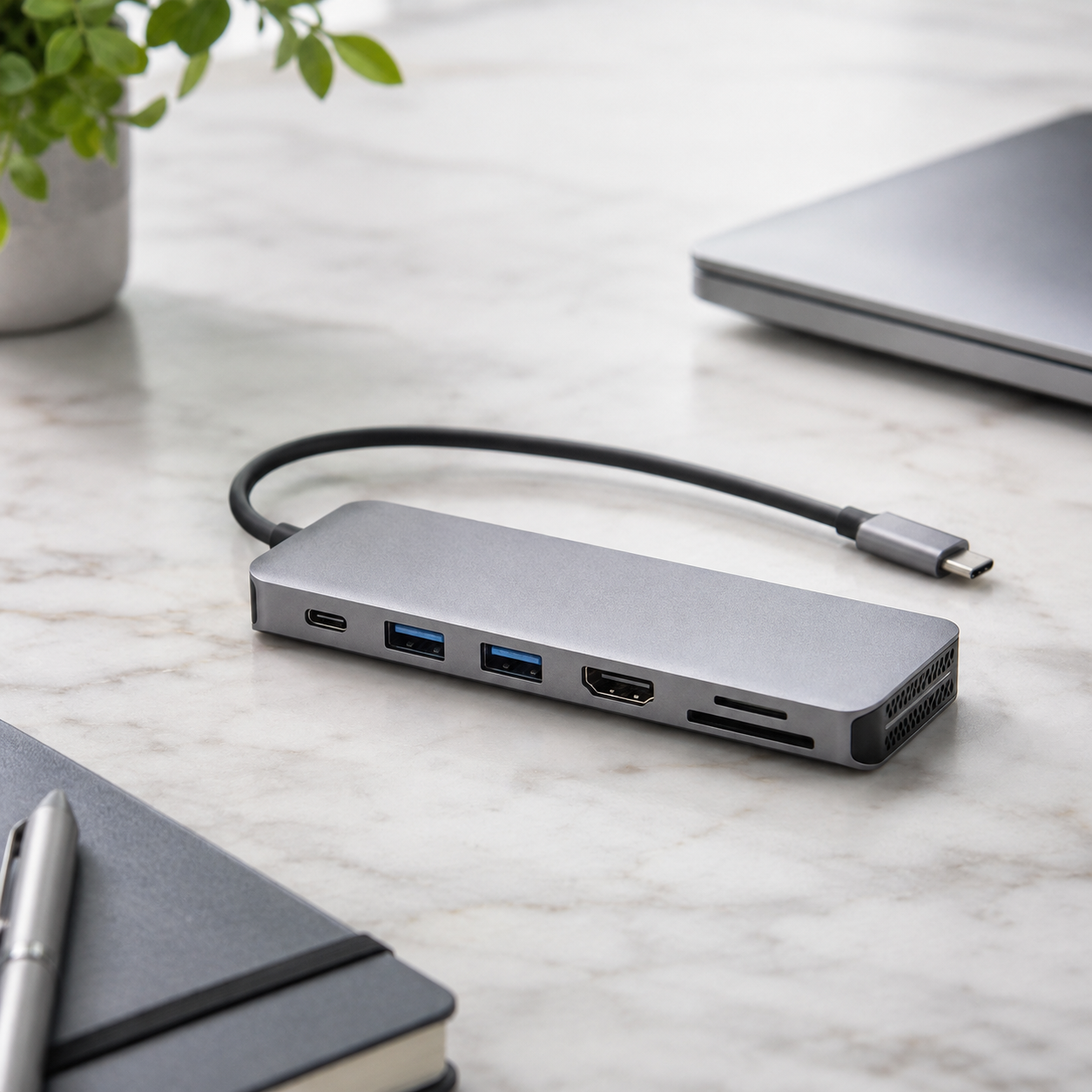
Caption: "A close view of USB-C hub ports helps buyers verify the real port layout before packaging approval."
ALT text: "Close-up USB-C hub ports HDMI USB-A SD Ethernet wholesale product detail"
AI image prompt: "Realistic close-up photography of a single premium aluminum USB-C hub on a clean white-gray surface, ports visible including HDMI USB-A USB-C PD and SD card slot, full product visible, square composition, commercial product photography."
Image 3 purpose: Shipment inspection photo.
Insert position: Before "FAQ".
Caption: "Shipment inspection should confirm packaging, carton labels, and functional samples before dispatch."
ALT text: "USB-C hub shipment inspection with cartons and retail packaging"
AI image prompt: "Realistic B2B shipment inspection photo, boxed USB-C hubs arranged beside export cartons, Asian quality control worker checking labels with clipboard, clean warehouse, natural light, authentic photography style."
CTA and Inquiry Popup Plan
Mid-article CTA position: After "Factory Testing and Shipment Inspection".
CTA text: Send Your Requirements
CTA copy: "Share your required port combination, target market, packaging style, and estimated order quantity. ByteAero can help prepare a practical USB-C hub quotation for retail or distribution."
End CTA position: After "Conclusion".
CTA text: Get a Quote
Popup trigger suggestion: Show after the reader scrolls 40%, or after 30 seconds on page, with exit-intent trigger on desktop.
Popup title: "Need a USB-C Hub Wholesale Quote?"
Popup copy: "Tell us your required port layout, packaging needs, and target market. We will reply with suitable model options and sample suggestions."
Suggested form fields: Name, Email, Phone, Company, Country/Region, Required Ports, Order Quantity, Message.
Submit button text: Send Requirements
Conclusion
USB-C hub wholesale sourcing requires more than comparing product photos and port count. Buyers should define the application, confirm HDMI and PD behavior, test real samples, review thermal stability, and prepare accurate packaging claims. A practical factory testing and shipment inspection process helps reduce after-sales problems and supports repeat orders.
ByteAero supports B2B buyers sourcing USB-C hubs, mobile accessories, audio products, charging products, and connected devices. Contact us to discuss your product application, packaging requirements, and target price range.